Showing posts with label Free Downloads. Show all posts

Tuesday, September 28, 2010

Apple News: TV on an iPad + Free iPod Calling

yap.TV [Add TV to your iPad]

yap.TV allows you to watch your favorite television shows right from your 3G iPad. The application is also free and available on the itunes website. To learn more information about yap.TV go to www.yap.tv or check read more about yap.tv here. [TechCrunch]


To Download Yap.TV directly on to your iPad, please click the link below:


Pinger [Add Calling and Texts to Your iPod]
Pinger allows you to make calls and texts on your new Apple iPod Touch. Pinger was created by TextFree, an iPod Touch app company that allows its users free texts to other phones and iPods. Click here to read more. [TechCrunch]

To download TextFree, click the link below:


Check out the Pinger App:


--------------------------

Wednesday, September 22, 2010

DropBox comes to BlackBerry, updates for iPhone and Android


Dropbox, one of the best mobile productivity apps, has just been released for BlackBerry and updated for iPhone and Android. Dropbox allows users to sync a virtual drive between desktops, laptops, and mobile devices. Files in your DropBox folder can also be accessed on the DropBox website. Updates for iPhone and Android include HD video and picture support and ability to send files from other apps to your DropBox. This app represents the future of digital storage, as cloud computing is increasingly taking the place of more traditional forms of physical memory (external hard drives, flash drives, etc).

DropBox website: http://www.dropbox.com/

Wednesday, September 1, 2010

Why I love Plex and How It Just Got Better


I found out about Plex on April 28th, 2010 and have been using it daily since then. Those of you who know me personally, I have made you download the application. Plex allows you to not only download and watch apps such as Netflix, CNN, Youtube, MLB, NatGeo, and many others, it allows you to watch all your personal movie files as well, including your .mkv files.

There are other apps that allowed you to do this as well, but most of those froze when trying to play an 11.1gb 1080p .mkv file of Dark Night. Plex allowed me not only play, pause, fast forward and rewind movies of this size, but it also allowed me to do it using my iMac and apple remote, turning my computer into a full entertainment system.

Plex also lets you access other programs on your computer as well, such as the dvd player, or hulu desktop. From across the room, using only the five button apple remote I am able to access pretty much any tv show, movie, or movie file I want.


The new iPhone / iPod / iPad app now allows you to control Plex from your mac device. So you iPod has now become a multi media controller. Also, the new version of Plex, for mac, has a better interface and more apps so you can watch Comedy Central, MTV, NBC, Netflix, plus a lot more.

Plex version 9 has recently come out and is available for free download now at www.plexapp.com. If you have a mac and like watching movies, I advise you download this app immediately.


Sources: [CrunchGear] [TechCrunch] [Plex]

Tuesday, March 16, 2010

How to Download Hulu Videos


Stream Transport allows you to record Hulu, YouTube, and pretty much all other web content videos that are usually untouchable. Download it now for free [windows only] before the website is shut down.

Sources: [SteamTransport] [Gizmodo]

Thursday, February 4, 2010

Google Notifier - For the Email Obsessed


Obsessed with checking your gmail account? If you have a mac you should download Google Notifier


Get instant access to your inbox all from the top of your Mac with great ease.

Thursday, January 7, 2010

The Future of Newspapers


As people move away from reading printed newspapers to the internet and television news, newspapers are becoming more and more extinct. But the New York Times, whose website is already a popular news source, has turned to the computer application.

Now instead of subscribing to the New York Times newspaper and having it delivered to your home every morning, you can download the free TimesReader 2.0 application for all operating systems. This application allows you to read the newspaper every morning from your computer, creating the feel of a newspaper with the technological advances of the internet.

Though a full subscription of the TimesReader cost $3.45 a week, but the free version works perfectly and updates me on the news I want to read. Digital newspapers are the clear future of
printed ad, and the creation of the newspaper application was a smart move by the NYTimes.

The future business applications of this product are endless. Once OE Technology released its 6 mainstream technology products next year, TimesReader is almost positively going to be part of the automobile entertainment system. Imagine calling a cab, getting in the back seat and being able to flip through the digital newspaper on the OE Technology touchscreen entertainment system, all while on your way to work.

Try the TimesReader 2.0 for Free here: Download

Wednesday, December 30, 2009

Best Free Mac Apps of 2009

Alice
Create 3D models and learn programming with an easy drag-and-drop method designed for students.


Avery DesignPro
Design and print labels, business cards, dividers, T-shirt transfers, greeting cards and more, using templates and stock art. Merge data from Address Book, Mail, iPhoto and iTunes.


Celtx
Celtx specializes in story development and script writing for film, TV, theatre and new media. Features include a project schedule, media rich breakdowns, production reports, and collaboration. Amazing that you get all this free.


Dream Diary
Keep track of your dreams — or any other notes — by date and subject.


Fluid
Fluid lets you create a Site Specific Browser (SSB) out of any website or web application, effectively turning your favorite web apps into desktop apps.


Freedom
If you cannot help but surf the internet instead of doing business or school work on your mac, Freedom is perfect as it shuts off and locks your internet access for the time you set it for. The only way to access the internet while freedom is active is to restart your computer.


Gimp
Want to edit pictures but don't have photoshop. Download this program for free to edit and create digital media.


Hugin
Assemble a mosaic of photographs into a complete immersive panorama, stitch any series of overlapping pictures and much more.


Nvu
Don't want to use Front Page or Dreamweaver, Nvu is a free html editor great for creating blog entries on the go and editing webpage html.


Open Office
Microsoft Office alternative for Mac, completely free and works amazingly.


Pando
Send and receive files and folders up to 1GB with your existing email account. It bypasses email attachment limits and accelerates downloads of huge files and folders.


Site Sucker
Download an entire website so you can view it from your hard drive.


Sweet Home 3D
Interior design app helps you place your furniture on a house 2D plan, with a 3D preview. Choose from a variety of rooms and objects to put in them.


Vienna
Its better than getting the newspaper in the morning. Subscribe to Atom/RSS news feeds and podcasts. Imagine reading six or seven newspapers every morning.


Source: ThriftMac

Wednesday, December 16, 2009

Google Catching Apple in the Browser Game

Its official, Chrome has passed Safari in internet browser market share.

Safari Beta was no match for the Google Chrome and development of more and more web-based netbooks, especially now that Chrome Beta has been released for Mac's.

Try them both our for FREE:

Sunday, December 13, 2009

Mac Computer Game Store?


Sick of everyone telling you that there are no games for Mac's? Though it's partly true, the new Mac Games Arcade store is trying to change that in an Itunes sort of way. The application is free, takes up very little space, and there are a bunch of FREE games to download. If you own a Mac and have some free times on your hands, download this.


Steam: Buy and Play PC Games Without Leaving Your Desk


Instantly access your favorite games
The full Steam library and all future Steam releases are at your fingertips. After you've purchased a game, download it immediately and start playing

Easily browse multiplayer game servers
Steam's integrated server browser makes it easy to navigate thousands of Internet game servers.

Play your games on any PC
Once you have a Steam account, you can sign in from any PC to access your games. Your games are associated with your account, not your computer.

Best FREE Video Players


Going to turn your computer into a home entertainment center? Want to watch HD quality movies on your computer with surround sound? Below are a list of the best video players on the web that are FREE so that this Holiday Season you can enjoy the comforts of being at home in style.

1. VLC Player
Download: [Mac] [PC]

2. Quicktime
Download: [Mac] [PC]

3. Divx Player
Download: [Mac] [PC]


Handbrake - Save your DVD's on your Computer

Put in:

  • Any DVD-like source: VIDEO_TS folder, DVD image or real DVD, and some .VOB and .TS files
  • Most any multimedia file it can get libavformat to read and libavcodec to decode.

Create:

  • File format: MP4 and MKV
  • Video: MPEG-4, H.264, or Theora
  • Audio: AAC, CoreAudio AAC (OS X Only), MP3, or Vorbis. AC-3 pass-through, DTS pass-thorugh (MKV only)

Understudy: Watch Hulu, Netflix and more all from you Mac

Understudy allows access to streaming video through the Front Row interface of Mac OS X. The user can subscribe to multiple feeds, and select a video to watch from them. Understudy currently supports Hulu, Netflix, YouTube, and to some degree the BBC iPlayer.

Hulu Desktop - TV on your Computer for FREE


Scan Hulu's lineup of TV shows and movies, which you can browse in alphabetical order, by network or studio, or by Hulu channel. Watch a random video anytime by pressing and holding the "play" or "enter" button on your remote. Press and hold the "menu" button (tab or escape on your keyboard) to pull up a video menu to browse other options.

Hulu Desktop is a lean-back viewing experience for your personal computer. It features a sleek new look that's optimized for use with standard Windows Media Center remote controls or Apple remote controls, allowing you to navigate Hulu's entire library with just six buttons. For users without remotes, the application is keyboard and mouse-enabled. Hulu Desktop is a downloadable application and will work on PCs and Macs. It will initially launch as a beta product during which we plan to gather and incorporate user feedback to improve the service.

SizzlingKeys 4.0


Ever wish you could pause iTunes without leaving your current app? Wish no more. SizzlingKeys lets you control all aspects of iTunes with hot-keys that you define. Some unique features include:
- Intuitive preference pane
- Select playlist
- Search your entire library
- Beautiful floating status window
- Displays CD cover art when available
- Takes up very little resources
- SizzlingKeys4iTunes is free!

Flip-4-Mac: Play Window Media Video's on your Mac


With Flip4Mac Windows Media Components for QuickTime you can play Windows Media files (.wma and .wmv) directly in QuickTime Player and view Windows Media content on the Internet using a Web browser.

What’s New in this Version
- Added support for Apple’s Mac OS X Snow Leopard.
- Local files now import in the background by default so that your movie is available for viewing almost immediately.
- The installer also includes a browser plug-in for Microsoft Silverlight, which allows you to play Smooth Streaming video content.
- Many more enhancements.

Click Here to Download It For Free

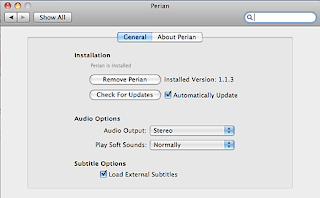
Perian - Play HD Movies Using Quicktime


Want to watch a movie off your mac in 5.1 or 7.1 digital surround sound? Then you are going to need to download this.

Perian enables QuickTime application support for additional media:

File formats: AVI, DIVX, FLV, MKV, GVI, VP6, and VFW
Video types: MS-MPEG4 v1 & v2, DivX, 3ivx, H.264, Sorenson H.263, FLV/Sorenson Spark, FSV1, VP6, H263i, VP3, HuffYUV, FFVHuff, MPEG1 & MPEG2 Video, Fraps, Snow, NuppelVideo, Techsmith Screen Capture, DosBox Capture
Audio types: Windows Media Audio v1 & v2, Flash ADPCM, Xiph Vorbis (in Matroska), and MPEG Layer I & II Audio, True Audio, DTS Coherent Acoustics, Nellymoser ASAO
AVI support for: AAC, AC3 Audio, H.264, MPEG4, and VBR MP3
Subtitle support for SSA/ASS and SRT